


ClawDance: AI Video Generator
4.728.00 Reviews
App Specs
- Version
- 1.3.1
- Updated On
- License
- Free
- Downloads
- 10,000+
- Developer
- iKame Applications - Begamob Global
- Categories
- Photography
- Platform
- Android
Screenshots
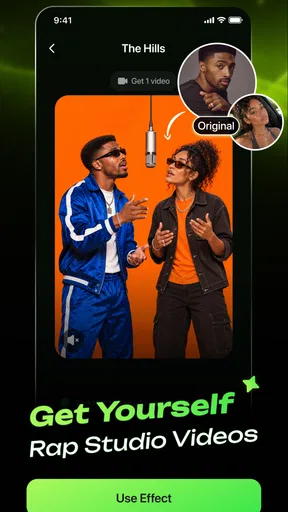
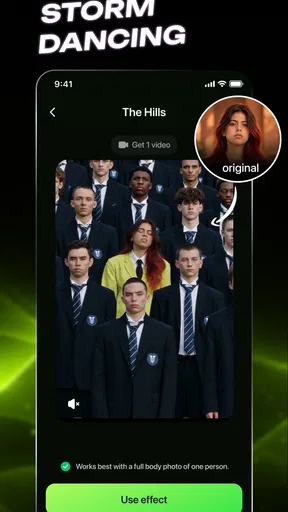
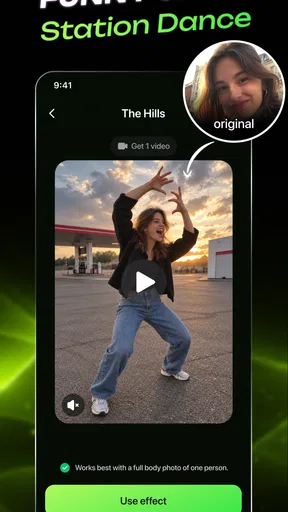
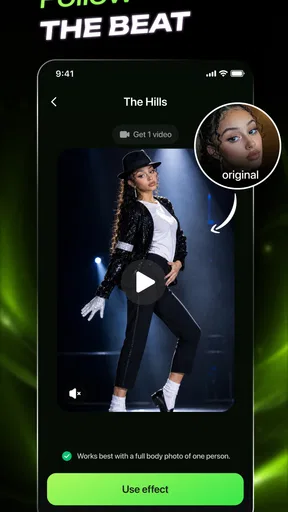
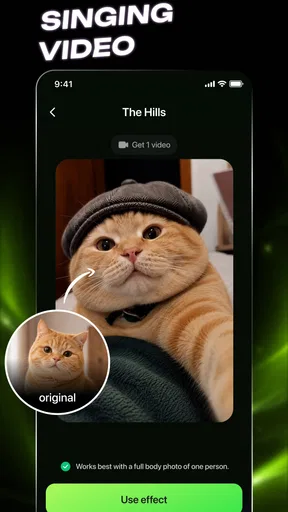
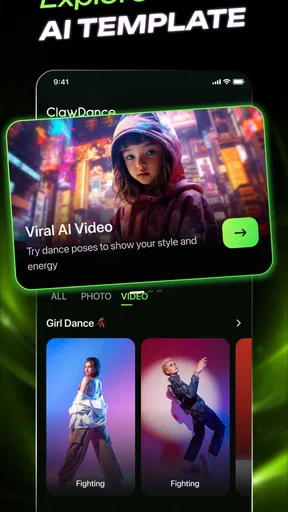
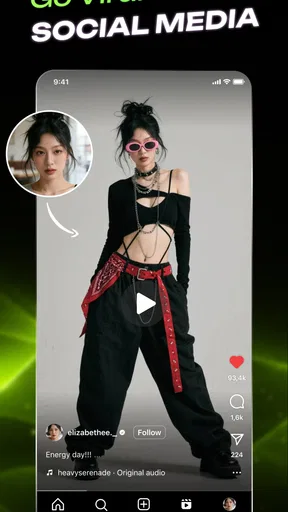
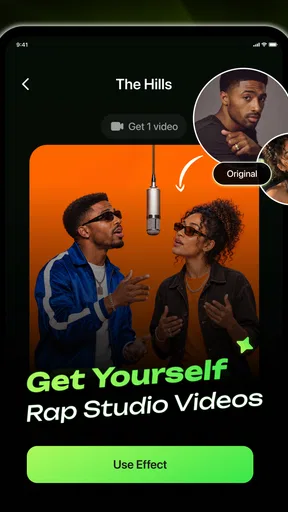
 Analysis by AppCompare
I spent time with ClawDance: AI Video Generator as a photography app, and my first impression was that it is aimed at people who want to turn a still image into something more lively without learning a full video editor. Its central appeal is simple: start with a photo, use AI-assisted animation and editing, and create a short visual that feels more suitable for sharing than an untouched image. That makes it interesting for casual creators, social posts, playful experiments, and anyone who wants a quick result rather than a long editing session.
The app is developed by iKame Applications - Begamob Global. It is free to install, carries an Everyone age rating, and currently appears as version 1.3.1 for devices running Android 7.0 or later. Its average rating is 4.7 from around 1.6 thousand ratings, with over 10 thousand installs, so there is already enough public interest to suggest that the basic idea connects with users. Still, I would not treat the rating alone as proof that it will suit every workflow. AI video tools can be enjoyable in a few minutes and frustrating when you expect precise creative control.
How the free access and paid value fit together
The most important cost detail is that ClawDance is free to install, while in-app purchases range from $9.99 to $89.99 per item. That creates a clear difference between trying the app and committing money to it. I would begin with the free experience and only consider paying after checking whether the available creation process produces the kind of movement and finish I actually want.
This matters because an AI video generator is not valuable simply because it can animate a picture. The result has to be usable for your purpose: a message to a friend, a social post, a visual joke, a small promotional idea, or a personal memory. If the free access lets you understand the workflow and judge the output before purchasing, that is a sensible way to approach it. If you already know you need a professional editor with exact timing, layered adjustments, and dependable repeatability, the larger purchase options may not be the best use of your budget.
I also recommend separating two questions before spending anything. First, do you enjoy the creative process itself? Second, does the finished clip save you enough time or produce enough novelty to justify a purchase? Those are not the same thing. A fun experiment can be worth doing for free without being worth a high-priced upgrade, while a creator who repeatedly needs animated image content may see more practical value in paying.
For me, the free entry point is the strongest part of the value proposition because it lowers the risk of testing an unfamiliar AI workflow. The paid side deserves more caution. I would judge it by the quality and usefulness of the actual outputs I can make, not by the promise of creating something viral. Virality is never guaranteed by an app, and a polished idea still needs a good source image, a clear concept, and a platform where people want to watch it.
What the app is useful for in everyday life
A realistic scenario would be preparing a quick birthday message. I could choose a portrait, animate it into a short clip, and send something more personal than a static greeting. The same approach could work for a travel photo, a pet picture, a before-and-after moment, or a simple announcement for a small community page. In these situations, speed and playfulness matter more than frame-by-frame control.
Worth Reading Before You Choose

EA SPORTS FC Mobile 26 Is a Bigger Football Game, but It Takes Time

Flipboard Shows What News Apps Must Do Beyond the Feed

Switching to Android Auto Means Rethinking Your Driving Routine

Google Calendar Makes a Crowded Week Easier to Manage

Ludo King Makes the Most of the Minutes Between Plans

Baby Panda World Brings Quick Play to Modern Phones, but Its Game Library Feels Busy
Another useful workflow is testing a visual idea before investing time in a larger project. A photographer might have a still image that works well but wants to see whether movement adds energy. A small business owner could explore an animated version of a product image before asking someone to create a full campaign. A student might use a moving visual in a presentation or social update. In each case, the app is most helpful as a rapid concept tool rather than a complete production studio.
One practical tip is to begin with an image whose subject is easy to understand. A clear face, a distinct object, or a simple scene gives the animation process a better starting point than a crowded photograph with several competing subjects. This is not a promise that every result will be perfect, but it is a sensible way to reduce confusion and make the generated movement easier to judge.
I would also keep the original image untouched and treat each attempt as an experiment. Save the clean photo separately, then compare the animated version with it. That makes it easier to decide whether movement genuinely improves the image or merely adds novelty. AI effects can be entertaining, but a still picture may remain the stronger choice when the subject depends on detail, realism, or a carefully composed moment.
Where its creative value stands out
The strongest idea behind ClawDance is accessibility. Traditional mobile video editors can offer many controls, but that flexibility often means spending time learning timelines, transitions, keyframes, and export settings. An AI-focused tool can be more approachable for someone who thinks in terms of “make this picture feel alive” rather than “animate this layer over a specific duration.” That difference makes the app easier to recommend to casual creators.
It also encourages experimentation. A person who would never open a conventional editor may be willing to try an image animation app because the starting point is familiar: choose a photo and see what happens. That low-pressure approach is useful when the goal is amusement, inspiration, or a quick post rather than technical perfection.
There is a subtle advantage in using a dedicated tool instead of forcing a general editor to do everything. A general editor is usually better when I already know exactly what I want. ClawDance is more appealing when I want the app to help generate the direction. That makes it closer to a creative prompt partner than a conventional timeline editor, even though I would still evaluate every result before sharing it.
My advice is to use it in short creative rounds. Pick one image, make a version, inspect the motion, and decide whether the concept works before trying to build a collection. This prevents the common mistake of generating many clips without a clear purpose. The best result is not necessarily the most dramatic one; often it is the clip where the motion supports the subject and does not distract from it.
The tradeoffs compared with familiar alternatives
Compared with a standard photo editor, ClawDance offers a more direct route to movement. A photo editor is usually better for correcting color, cropping, retouching, and making a still image look finished. If your main need is image quality rather than animation, a dedicated photo editor remains the more sensible choice.
Compared with a conventional mobile video editor, ClawDance is likely to appeal more to people who want automation than precision. A timeline editor gives clearer control over cuts, timing, audio placement, captions, and the order of multiple clips. That control is important for a narrated video, a product demonstration, a tutorial, or any project where every second matters. I would choose the usual editor for those jobs and use ClawDance earlier in the process to explore an animated visual idea.
It also differs from a full desktop creative suite. Desktop software is generally more suitable when a project needs repeatable results, detailed compositing, or a carefully managed production workflow. ClawDance makes more sense when convenience is part of the goal. The tradeoff is straightforward: less apparent complexity can mean a faster start, but it may also mean fewer ways to correct an output that does not match your intention.
One non-obvious tradeoff is the relationship between surprise and consistency. AI-generated motion can make a familiar photo feel fresh, but that same unpredictability can be a problem if you need several clips to share the same visual style. For a one-off greeting or playful post, surprise is a benefit. For a branded series or a carefully planned campaign, consistency matters more, and I would lean toward tools with stronger manual controls.
Another point is audience expectation. A moving portrait or imaginative image can attract attention because it is unexpected, but viewers may also notice strange motion or an effect that feels disconnected from the original photo. I would show a draft to someone else before publishing anything important. A creator can become attached to the novelty after watching the generation process repeatedly, while a fresh viewer may immediately see whether the result feels natural or distracting.
Who is likely to get the most from it
ClawDance is a good fit for casual photographers, social users, meme creators, and beginners who want to experiment with AI-assisted video without starting with a complex editing lesson. It may also suit someone who has a large camera roll and wants to find new uses for images that would otherwise remain static. The Everyone rating makes it approachable for a broad audience, although younger users should still follow the purchasing rules and device guidance set by the adults responsible for them.
I can also see value for small creators who need occasional visual ideas but do not want to maintain a full editing setup. The app can help answer a useful early question: does this image have enough personality to become a short animated post? That kind of quick test can save time before moving to a more controlled tool.
It is less suitable for professional editors, filmmakers, or businesses that need guaranteed control over every visual decision. I would also skip it if my priority were detailed photo correction, advanced sound editing, or building a long multi-scene video. The app’s appeal is concentrated around AI-assisted animation and quick editing, so choosing it for a job outside that lane could lead to disappointment.
People who dislike trial-and-error may not enjoy it either. The most rewarding use of an AI video app usually involves testing an idea, rejecting a weak result, and trying a better image or concept. If you want to set exact motion paths and know precisely what the final frame will look like before rendering, a manual editor is a better match.
Simple habits that improve the experience
I would organize source images before opening the app. Create a small selection of photos with one clear subject, good contrast, and enough visual space around the important details. This makes it easier to compare outcomes and avoids wasting time on images that are difficult to animate convincingly.
I would also decide the purpose of the clip first. A playful personal message can tolerate unusual motion, while a business post may need restraint. That decision should guide how much experimentation I accept. When the goal is communication, the effect should support the message; when the goal is entertainment, a more surprising result may be exactly what makes the clip worthwhile.
Finally, I would review the finished video with the sound off and at normal playback speed before sharing it. Even without relying on technical measurements, this quick check reveals whether the visual idea reads clearly on its own. If the clip only seems interesting because I am thinking about how it was generated, rather than because it communicates something, I would return to the original photo or use a more controlled editing approach.
My buying decision
My recommendation is to try ClawDance first as a free creative experiment, especially if you enjoy photography but want to move beyond static images. It offers a friendly reason to revisit old photos and test animated concepts without committing immediately to a complicated editing workflow. The developer, iKame Applications - Begamob Global, has positioned it in a space where quick visual creation matters more than traditional editing depth.
I would not purchase simply because the app suggests that a video could become viral. I would consider the paid options only after creating enough free work to answer practical questions: do I like the animation style, can I make clips I would actually share, and does the process save me time compared with my usual editor? Since individual purchases range from $9.99 to $89.99, that personal test is especially important.
Overall, I see ClawDance as a playful AI video generator with a clear audience. It is strongest when I want a fast transformation from photo to animated idea, and weakest when I need exact production control or consistent professional output. For a friend who wants to make a portrait, pet photo, travel memory, or visual joke more dynamic, I would recommend trying the free version. For a serious video project, I would skip the purchase and use a conventional editor instead.
My final verdict: try it for creative discovery, but pay only when the actual results—not the promise of virality—prove that it belongs in your regular workflow.
Pros
- Turns text prompts and images into short AI-generated videos.
- Simple interface makes creating clips accessible to beginners.
- Useful for social posts
- creative projects
- and quick visual concepts.
- Offers multiple styles and effects for experimenting with video ideas.
- Cloud-based generation avoids needing powerful phone hardware.
Cons
- Generation quality can vary significantly between prompts and images.
- Processing times may increase during busy periods.
- Many advanced features may require a subscription or paid credits.
- AI results can include awkward motion
- artifacts
- or inconsistent details.
- Regular video creation may consume credits faster than expected.
FAQs for ClawDance: AI Video Generator
What is ClawDance: AI Video Generator and what can it do?
ClawDance: AI Video Generator is an AI-powered creative app designed to turn ideas, images, or written prompts into short videos. It can help users create animated clips, social media content, music-style visuals, and imaginative scenes without requiring traditional video-editing skills. The available tools, styles, templates, and output quality may vary depending on the app version, device, account type, and selected subscription or credit plan.
How do I create a video with ClawDance: AI Video Generator?
After opening ClawDance, you generally begin by choosing an AI video template, uploading an image, or entering a text description of the scene you want to generate. The app then processes the request and creates a video that can usually be previewed and refined. Clear prompts, suitable images, and specific instructions tend to produce more consistent results, although generation speed and accuracy can depend on server demand and the complexity of the request.
Is ClawDance: AI Video Generator free to use?
ClawDance may offer free access to selected features, previews, or a limited number of generations, but advanced tools and higher usage limits can require in-app purchases, credits, or a subscription. Before generating many videos, users should carefully review the pricing page, trial conditions, renewal terms, and available credits. A free download does not necessarily mean that all features or exports are available without payment.
Does ClawDance add watermarks, limit video quality, or require an internet connection?
AI video generation normally relies on cloud-based processing, so ClawDance is likely to require a stable internet connection for creating and downloading videos. Depending on the plan, exported clips may include a watermark, shorter duration, lower resolution, or other restrictions. Users who need content for professional publishing should check the export settings and licensing information before paying, particularly if they require high-resolution, watermark-free, or commercial-use videos.
Are videos created with ClawDance safe to use and suitable for commercial projects?
Users should review ClawDance’s terms of service, privacy policy, and content-usage rules before publishing generated videos or using them commercially. Avoid uploading private photographs, confidential documents, or images belonging to other people without permission. AI-generated content can also resemble copyrighted characters, recognizable individuals, or existing artistic styles, so users remain responsible for checking permissions, respecting privacy, and ensuring that their final videos comply with applicable laws and platform policies.


